Introducing Applowance
Earn screen time by completing chores.
The only app that uses Apple's FamilyControls to tie real app blocking directly to chore completion. Free for every family.
Introducing Applowance
The only app that uses Apple's FamilyControls to tie real app blocking directly to chore completion. Free for every family.
Simple by design
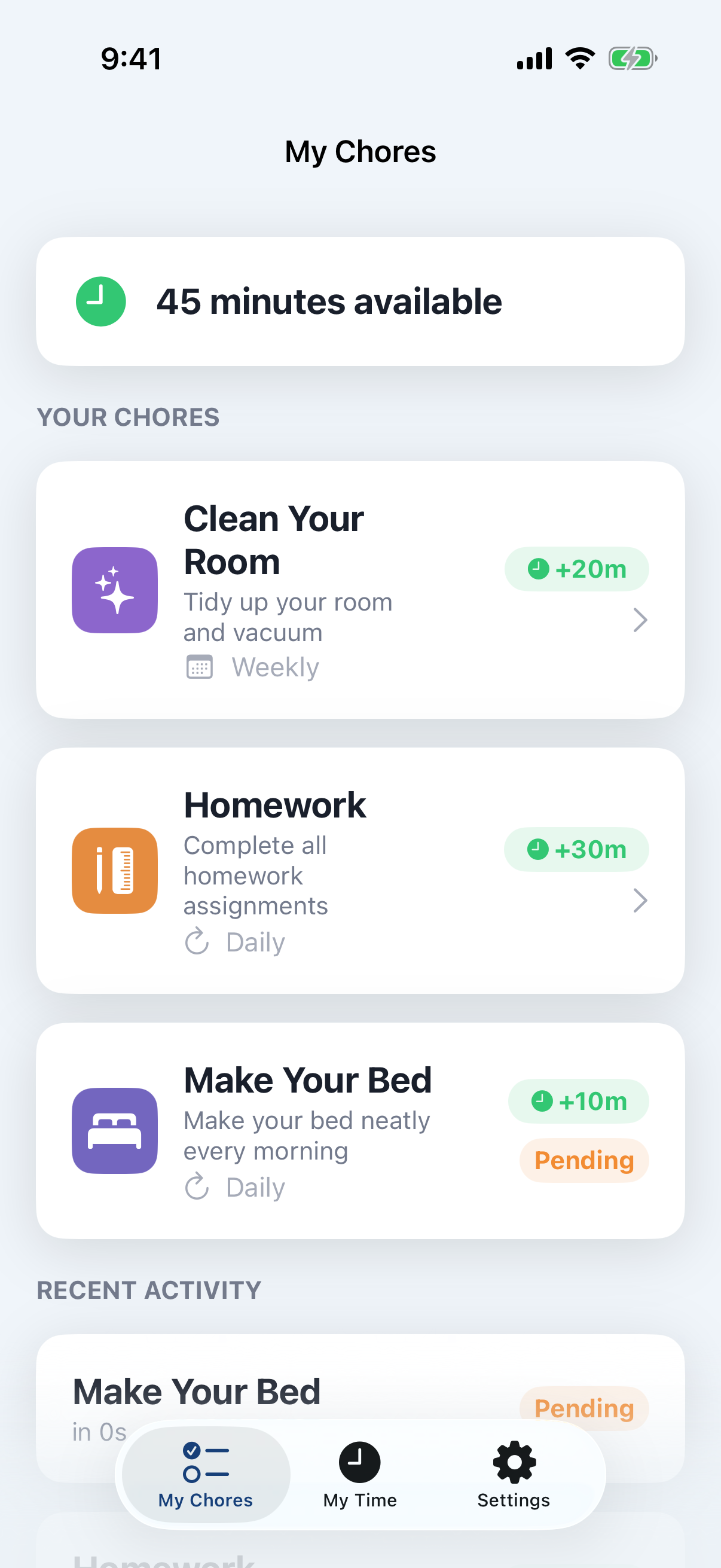
Create chores like "Make bed" or "Do homework." Set a screen time reward in minutes for each one.
Children mark chores done on their device. You get a push notification instantly to approve or deny.
You approve, minutes are added. Apps unlock. When time runs out, everything locks again. Automatically.
What makes it work
This app is locked
Complete your chores to earn screen time!
Open ApplowanceApplowance uses Apple's FamilyControls API to programmatically lock apps and websites. When screen time runs out, the apps go dark.
Parent
3
pending
Child
45
minutes
Firebase-powered real-time sync means when you approve a chore on your phone, your child's balance updates instantly on theirs.
Make bed
Daily
Do homework
Daily
Walk the dog
Daily
Clean dishes
Weekly
Create one-time, daily, or weekly chores with custom screen time rewards. Kids see exactly what they need to do and what they'll earn.
When kids start a session, a countdown timer begins. They see every second. When it hits zero, the apps lock. Automatically. Every time.
Chore Completed
Emma completed "Make bed" and is waiting for your approval.
Session Ending Soon
Emma's screen time ends in 5 minutes.
The moment your child submits a chore, you get a push notification. Approve or deny directly from the notification.
Enter your PIN
Each child gets their own profile secured by a PIN. Parents manage everything. Kids see only their chores and their time.
We believe the chore-to-screen-time loop should work for every family, not just those who can afford a subscription. These features will always be free.
Because building responsibility shouldn't cost a thing.
Create chores, earn minutes, unlock apps. The full cycle, always free.
FamilyControls integration that actually enforces limits. Not a suggestion.
Your whole family stays connected in real time across every device.
Know instantly when your child completes a chore. Approve from anywhere.
Enough for most families. No credit card, no trial, no catch.
Pricing
The core experience is free forever. Upgrade when you're ready for more.
Everything you need to get started
Free forever
Get StartedBuild habits and keep kids motivated
Get Family
The complete family management toolkit
Get Family+
Questions & answers
No. Applowance uses Apple's FamilyControls and ManagedSettings APIs — the same system-level technology behind Screen Time. Restrictions are applied at the OS level through a ManagedSettingsStore, which cannot be bypassed by children from their device. When screen time runs out, the DeviceActivity monitor extension automatically re-applies restrictions within seconds.
Yes, but it's one free download that works on both. Parents sign in with their Apple account and create chores. Children join the family using a 6-character invite code on their own device — or a parent can add them directly on a shared device.
When the countdown reaches zero, the DeviceActivity monitor extension automatically re-applies app restrictions. Blocked apps display a custom shield screen that encourages your child to complete more chores. This happens even if the app is in the background — it's enforced at the system level. A 5-minute warning notification fires before the session ends so there are no surprises.
The Free plan supports up to 2 children and 1 parent. If you need more, the Family plan ($2.99/mo) and Family+ plan ($4.99/mo) both support unlimited children. Every child gets their own profile, chore list, and screen time balance. Children can join from their own device using an invite code or be added by a parent on a shared device.
Applowance stores only what it needs to function: chore names, completion status, screen time balances, and family member names. Parents sign in with their Apple account for cross-device access. Children join anonymously via invite code — no email or password needed for them. We don't sell data, we don't run ads, and we don't track your children's browsing activity.
Yes. Applowance runs on any iPhone or iPad with iOS 18 or later. The FamilyControls-based app blocking works the same way on both devices. Your family's data syncs automatically between all devices.
The Applowance Promise is our commitment that the core features will always be free: the chore-to-screen-time loop, real app blocking via FamilyControls, cross-device sync, push notifications, and support for up to 2 children. Premium tiers like Family and Family+ add powerful extras, but the fundamentals work for every family, no credit card required.
Applowance has three tiers. Free gives you the complete chore-to-screen-time experience for up to 2 children and 1 parent, including real app blocking, cross-device sync, and push notifications. Family ($2.99/mo) adds chore streaks, bonus time rewards, 31 age-appropriate chore templates, and weekly summary reports. Family+ ($4.99/mo) includes everything in Family, plus photo proof for chore completion, custom rewards with a reward store, detailed usage reports with charts, allowance tracking, and a family activity log.
Yes. You can upgrade or downgrade at any time from the Settings screen inside the app. When you upgrade, you get immediate access to new features. When you downgrade, your current plan stays active until the end of the billing period. All subscription changes are handled through Apple's App Store, so you can also manage your subscription in your iPhone's Settings under Subscriptions.
Your data is never deleted when you downgrade. Features like chore streaks, photo proofs, and usage history are preserved -- you just won't be able to access them until you upgrade again. If you downgrade to Free and have more than 2 children, existing children remain in your family but you won't be able to add new ones until you upgrade or reduce to 2.
Yes. Both the Family and Family+ plans offer annual billing at a discount of roughly 17%. The Family plan is $29.99/year (instead of $35.88) and Family+ is $49.99/year (instead of $59.88). You can switch between monthly and annual billing at any time through the App Store.
No. App blocking through Apple FamilyControls, the chore-to-screen-time loop, cross-device sync, and push notifications are all part of the Free tier. You never need to pay to enforce screen time limits. Subscriptions unlock additional features like chore templates, streak tracking, photo proof, and detailed reports.
Coming soon to the App Store. Free to use. Real results.